A dead key fob battery can turn a convenient routine into a frustrating few minutes at the worst possible time. But, lucky for you, the vast majority of fobs have replaceable coin batteries very easily, and you can perform this swap at home in just a couple of minutes once you know which kind of battery you need and how to carefully prise open the unit. The most common battery sizes in modern key fobs tend to be a CR2032, CR2025, and CR2450.
Why the key fob battery matters
Beyond the door unlock function, your key fob can activate remote start and trunk release, and it can enable passive entry (keyless unlocking of doors) and push-button start, so a dead key fob battery will be disruptive well before it completely fails. Usually, a weakened battery manifests as: Less key fob range or slower response to your commands; Having to hold the fob closer to your car for it to function. Many cars will also no longer detect your fob for starting, so even these early signs are cause for caution.
How to tell it is failing
The key fob battery doesn’t usually die at once. Most of the time, it begins to be erratic and work sporadically especially in short ranges before it eventually dies down altogether. The dashboard will display messages such as “Key Not Present” and your push-to-start will also start acting up less consistently. You may also find that it only works if you’re standing right at the door, in which case the fob battery is your likely culprit.
Finding the right battery
The critical part of this process is making sure you purchase the correct battery for your key fob model. The type and number of the required battery are typically stamped on the existing coin cell battery; some fob cases have this printed on the inside, and for older fobs it may be listed in the user manual. Many remotes use either a CR2032, CR2025, or a CR2450 (though sometimes a smaller button or coin battery). Ensure you get the same exact size battery with the correct positive/negative placement – putting a different size or wrong direction battery will ensure your keyless entry will not work.
Best way to verify the battery
This is very easy – just pop open the fob, check out the number on the old battery, and get the same replacement. If the battery was lost or otherwise not clear, look up the make, model, and year of your vehicle in the owner’s manual and vehicle information manual; do not guess it by using a vehicle battery chart.
Tools you will need
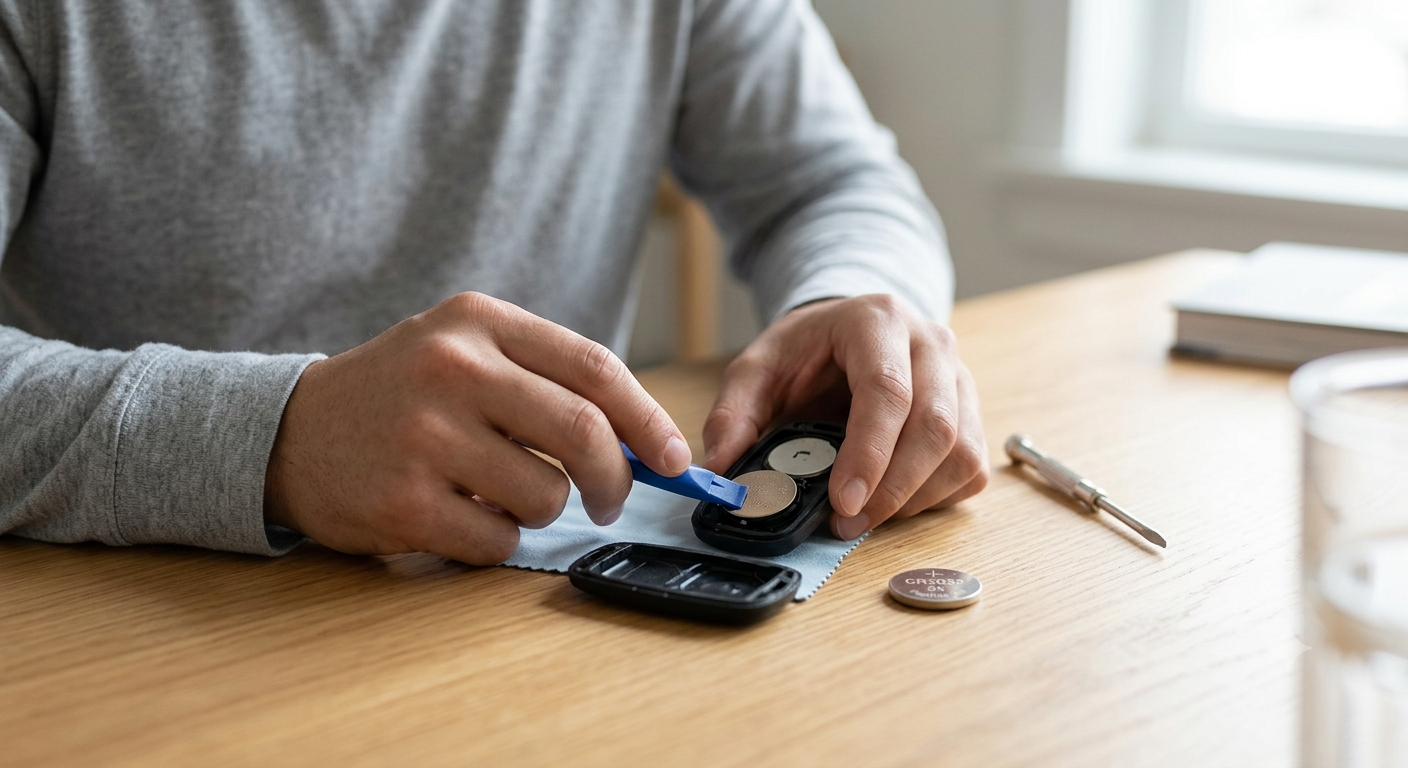
How To Change Your Key Fob Battery To Replace a car key fob battery, you’ll need very few tools-most replacements don’t involve anything complicated. The most important thing you’ll need to have is the replacement battery. Along with that, it’s helpful to have a small flat-head screwdriver or a plastic pry tool to open the case of your key fob.
It’s also a good idea to have a cloth with you so you can rest the key fob on top of it while you’re working on it.
In some cases, there’s a mechanical key built inside the fob which must be removed prior to getting the case open. It’s safer to use a plastic tool than a metal one, as a plastic tool makes you less likely to scratch the key fob or even break the plastic housing.
Step-by-step replacement process
Design will differ depending on the brand, but changing most fobs over tends to be identical. The best way to figure out how to open it is to first search for a notch, or crack, or a release tab between the two plastic halves of the key fob. Many key fobs have a secret keyblade hidden in them; if this is true then removing the keyblade is your best bet to open up the key fob. Once you get the fob open, memorize where your battery is in.
1. Open the fob carefully
Insert a coin, tiny flathead screwdriver, or a plastic pry tool into the seam and twist lightly until the shell pries apart. (If the fob has a screw, turn it out first with a small Phillips head.) Go easy, otherwise you could break thin plastic clip latches.
2. Remove the old battery
Use a fingernail or a plastic tipped tool to lift the old battery out of its slot, if you can. Be aware of the way the battery was positioned, because the replacement must be in with the correct polarity. If there are clip holding the battery, bend them just enough to allow the battery to slip out, rather than going the entire way around so you don’t damage them. Don’t handle the contacts if you can help it, you want the battery to seat as well as possible, and dirt, dust and grease get in the way.
3. Install the new battery
Line up the new battery with the orientation of the old battery. While the positive end will likely be up for most fobs, this rule does vary, so the safest way is to simply mirror how the old battery was. Slide the new battery into the case and gently press down until it is snug. If the battery feels wobbly or tilted, try to adjust it or remove and reinsert it before replacing the case.
4. Reassemble and test
Align the halves of the fob and press them together until they snap shut. If your fob has a screw or mechanical key insert, reinstall it before testing. Then check the lock, unlock, trunk, and start functions near the vehicle. If the fob still does not work, recheck the battery type and orientation first.
Common mistakes to avoid
You’re also highly likely to install the incorrect size battery. The CR2032, CR2025 and CR2450 battery size can look similar to others, but the are not universally suitable for all fobs. Additionally, it’s easy to put a battery in backwards – in which case, your fob simply won’t function. Lastly, avoid trying to prise your fob case open as they’re often fitted together with a series of tiny plastic clips that are very prone to cracking.
What to do if a new battery does not fix it
If the fob is still not working with a new battery, then the issue is not the battery itself. It could be worn contacts, corrosion within the fob, a broken button or a broken circuit board. Additionally, the car may need to be reprograms for the fob to work again, especially if the fob is not original or has been broken. If this is the case then you might as well go to a locksmith, dealer or automotive electronics shop before changing the battery again.
Battery life and replacement timing
Key fob batteries can provide power to your fob for a few years-two to four years is generally expected-but this will vary greatly by usage. Driving often, a key fob that sits in a hot car, and pushing a lot of buttons will reduce its overall lifespan. When the key fob shows signs of failure (e.g.
The range is drastically reduced or no longer working), a battery replacement is often preferable to having the key fob fail on you completely when you need to get into and start your car.
It’s an easier, cheaper fix.
Practical tips for safer DIY replacement
Do this work on a clean table to avoid the battery and little clips dropping on the floor. Place a cloth under the fob to reduce the risk of scratching the shell. Don’t forget the screws and the mechanical key if there is a model of yours, these small pieces are very easy to lose. Do not put the old battery in the household trash because coin cells are classified as hazardous waste and must be disposed of or recycled responsibly.
When replacing the battery is not enough
Sometimes it’s the fob, not the battery If your fob has a cracked shell, soft buttons, or water damage, it’s sometimes less hassle in the long run to simply buy a new fob. Older fobs might not be dependable even with a new battery if they have been in service for years, and a new fob might be your actual solution.
Conclusion
Easy as pie: Replacing a key fob battery It doesn’t take more than 5 or 10 minutes to change the battery on your car’s remote key fob, but pay close attention to these steps to ensure a successful fix. Find the right battery, pay attention to how the existing battery was installed in the remote’s housing, be sure not to force the cover open, and be sure to test the remote after the battery replacement is complete. If the fresh battery doesn’t put your remote key fob back in working order, the issue isn’t with the battery, it could be with the battery contacts or remote’s electronics, and might need reprogramming.
Common Questions To Ask
1. How do I know which key fob battery I need?
Check the old battery inside the fob, the owner’s manual, or the battery compartment for the printed model number. Most common replacements are coin-cell batteries such as CR2032, CR2025, or CR2450.
2. How long does a key fob battery usually last?
Many key fob batteries last about two to four years, although usage and environmental conditions can shorten that time.
3. Can I replace a key fob battery myself?
Yes. In most cases, you only need a small pry tool or screwdriver and the correct replacement battery. Many fobs are designed for easy battery access.
4. What happens if I install the battery backward?
The fob usually will not work correctly, and in some cases the wrong orientation can cause additional problems. Always match the direction of the old battery.
5. Why does my key fob still not work after a battery change?
The issue may be dirty contacts, internal damage, a bad battery, or the need for reprogramming. If the fob was dropped or exposed to water, the battery may not be the real problem.
6. Do all key fobs use the same battery?
No. Many use similar coin-cell sizes, but not all are interchangeable. The exact battery depends on the vehicle and fob design.
7. Should I replace both key fobs at the same time?
You do not have to, but it can be practical if both are the same age and both are used regularly. That helps reduce the chance of one failing shortly after the other.